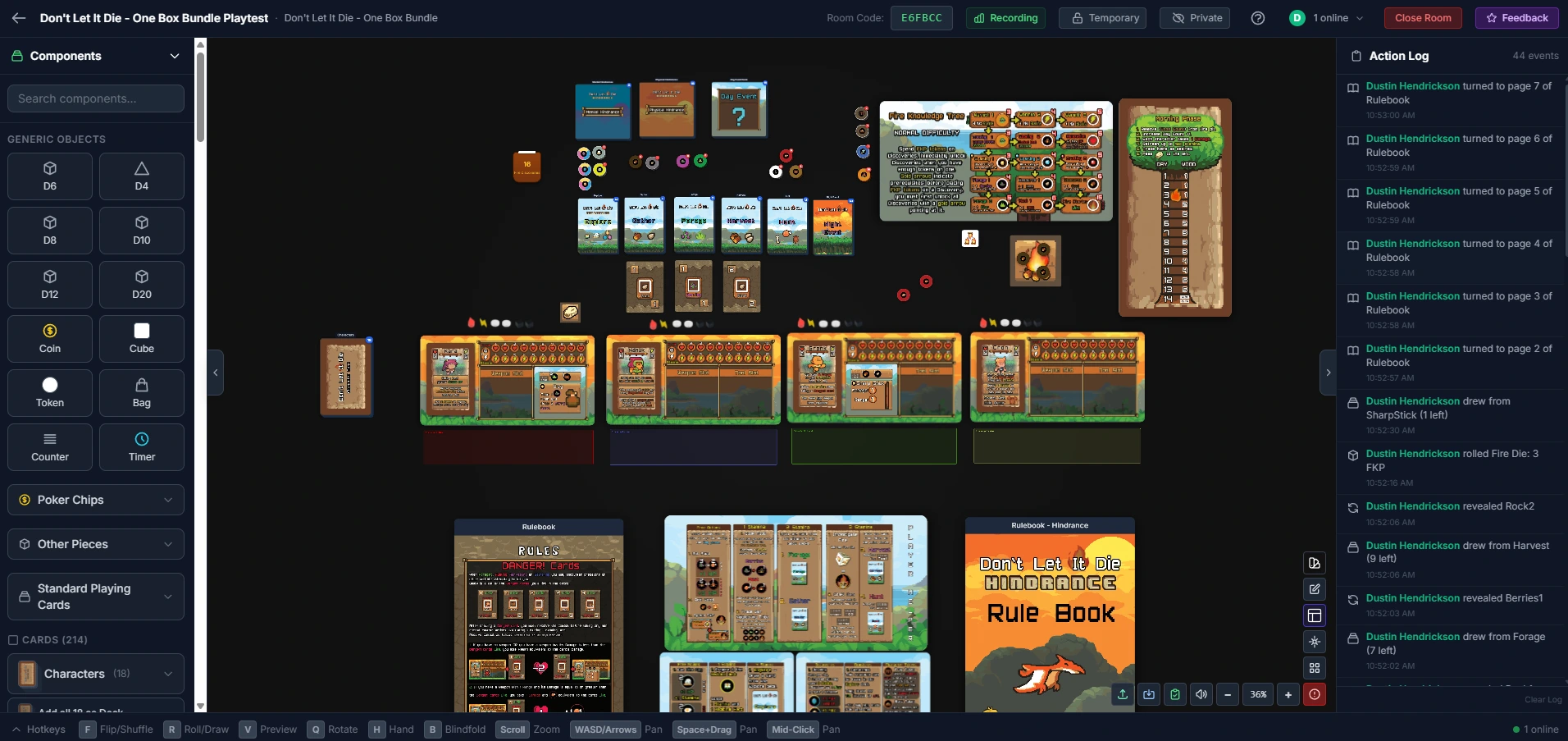
Stop waiting for package deliveries to find out if your game works. Build your component library, run live multiplayer sessions with anyone anywhere, and collect structured feedback — all before you print a single card. No physical prototype. No shipping. No account required for your testers.
No credit card required • Free forever plan available
Want free Pro access?
We're offering free Pro upgrades to active beta testers. If you're a TGC designer or have a game ready to test, we especially want to hear from you.
Sign up and apply for Beta Access →Just here to play a game?
No account neededBrowse community game setups and host a live session instantly. If you play a designer's game, leave them feedback so they can keep improving it.
Browse community setupsSet up a playtest session faster than it takes to print a prototype.
Start from scratch or bring what you already have. Drop in a CSV to bulk-load an existing design, or sync your project directly from The Game Crafter — components, images, and pricing in one click Pro.
Every card, die type, token, and board lives in one library. Edit inline, watch live production costs update as you design, and run probability checks on your distributions without opening a spreadsheet.
Open a multiplayer room. Share a 6-character code. Your testers click a link — no download, no account needed — and you're playing together in seconds.
Tester feedback lands straight in your project dashboard Pro. See what broke, what lit up the table, and where balance fell apart — then export polished component sheets as PDFs or CSVs Pro to pitch publishers or share with backers.
Not a slide deck. Not a shared image. A live, fully interactive tabletop where every component from your project becomes a game piece your testers can actually touch. Drag, flip, shuffle, draw, roll — everything synced the instant it happens. No app. No download. Just a link.
Zero-lag real-time sync powered by WebSockets. Your tester on the other side of the world sees the card flip the moment you release it. Live cursors show exactly who's touching what.
Project a square or hex grid onto any board. Configure cell size to match your design, then toggle grid snapping on or off per session — place tiles precisely or freeform as needed.
Keyboard shortcuts, right-click context menus, multi-select, rotate, flip, stack, deal, shuffle — the full vocabulary of physical tabletop interaction, in the browser. Touch-optimized too: tap, drag, pinch-to-zoom, and long-press multi-select work on phones and tablets. No learning curve.
Draw named areas anywhere on the table, then give them a type that defines how they behave:
Place snap points anywhere on the table — components lock to the nearest one on drop. The real power is Snap Tags: tag a snap point and a component with the same label, and that component will only snap to matching points. Resource cards only land on resource slots. Unit tokens only fill unit spaces. The ruleset is enforced by the table itself.
Private hand dock keeps each player's cards invisible to everyone else — just like a real table. Test deduction mechanics, hidden roles, and hand management without workarounds.
Testers can join from any device. The room is touch-optimized: pinch-to-zoom, tap-to-select, one-finger pan, and long-press multi-select. A floating action bar replaces keyboard shortcuts on phones — no app, no setup.
Set a component's physical dimensions once and the tabletop handles the rest — a poker card renders at poker card size, a 1″ token at 1″. Import from The Game Crafter and it's all set automatically. No fiddling with sizes per session, no guessing how components will feel relative to each other. What you see at the table is what your players will hold.
Save multiple named layouts per project — a 2-player setup, a 4-player setup, a solo mode. Every new session loads directly from the saved state you choose, zones, snap points, and all. Stop rebuilding the table every single time.
No account. No download. No onboarding email. Share a 6-character room code — your testers click a link and they're sitting at your table, touching your components, in seconds.
Not every playtest looks the same. Sometimes you need to be in the room. Sometimes the best data comes from stepping out of it entirely.
Your full game, live in a browser, with any group anywhere in the world. Share a 6-character code — your testers click a link and they're at the table. No account, no download, no onboarding. Every move syncs to every player the instant it happens.
Set up a public demo room, share the link, and step away. Testers play your game entirely on their own — no instructions from you, no guidance, no designer in the room. You get feedback on what the game is actually like to discover cold.
Save your table setup as a named demo and share it as a permanent public link. Publishers can try your game on their own schedule. Convention audiences and crowdfunding fans can play on demand — no appointment, no you required.
Cards, tokens, dice, boards, rulebooks, packaging — all in one place with inline editing
Is that mechanic actually balanced — or just feels balanced? Free calculators cover dice roll odds and card draw chances. Pro runs those numbers directly against your imported custom dice and deck configurations.
Live component cost totals updated as you design. Know your production budget at every iteration
Pull your entire Game Crafter project in a single click. Components, images, and pricing all sync automatically
Generate professional component sheets to share with publishers, manufacturers, or Kickstarter backers
Turn your component library into a print-and-play PDF — correct sizes, cut lines, bleed marks, auto-packed pages. Save layouts and regenerate after every artwork update.
Your component library is your single source of truth. Every card, die face, token, and board in one place. Edit inline, import from CSV or TGC, and get a live cost total as you design.
Free probability tools cover dice roll odds and card draw chances — enough to catch obvious balance problems before you sit down to play. Go Pro and run those same calculations directly against your actual imported dice configurations, with the custom faces your players will see at the table.
A feedback button is always available during or after a session. Testers fill out a structured form whenever they want — ratings, notes, impressions — and it goes straight to your project dashboard without you asking.
Your dashboard builds a running picture of every playtest: scores over time, most flagged components, and balance trends. All the data lives in one place, attached to the project it belongs to.
A feedback button sits right in the room — testers can submit at any point during or after play. Overall rating, component ratings, difficulty, balance, and free-form notes. All collected automatically, no Google Forms, no chasing people down.
Capture what broke mid-session without stopping the game. Log host notes, flag action items, and keep a record of what you were testing and what you found.
Go beyond the default form. Add your own questions per project — star ratings, numeric scales, multiple choice, or open text. Ask exactly what you need to know about your specific design, not a generic checklist.
Every action during play is logged automatically — card draws, dice rolls, component interactions, joins, and leaves. After the session your dashboard shows which decks got drawn most, dice roll distributions per die type, which components were touched most, how activity flowed across the session timeline, and a full per-player action breakdown. No manual tracking, no spreadsheets.
The small things that make the whole platform feel solid.
Every move, shuffle, roll, and draw is timestamped and logged during play — great for catching moments your testers forgot to mention in feedback
Drop a spreadsheet in and your component library fills instantly — always free. Pro to export your component data back out to manufacturers, publishers, or backers.
80+ built-in tokens, chips, bags, card backs, and dice mean you can playtest mechanics on day one — no asset commissions, no placeholder hell, no waiting
Upload your own die face images for custom dice that roll and display on the tabletop
Runs in any desktop or laptop browser — Chrome, Firefox, Safari. Full keyboard required for the tabletop. Your testers open a link and they're in.
Export polished, print-ready component summary PDFs for pitching to publishers or sharing with backers
Tabletop Simulator, Tabletopia, and Screentop are great platforms — but none were built around what a game designer actually needs to prototype, iterate, and collect feedback.
|
Designer's Den
free to start
|
Tabletop Simulator
$19.99 / person on Steam
|
Tabletopia
free account required
|
Screentop.gg
free
|
|
|---|---|---|---|---|
| Getting Started | ||||
| Runs in browser — no download or install | Yes | Steam app required | Yes | Yes |
| Testers join via link — no account, no sign-up | Yes | Steam account + $19.99 purchase | Free account required | Yes |
| Playable on mobile & tablet browser (touch controls, pinch zoom, multi-select) | Yes | Limited | Limited | |
| Upload a spreadsheet (CSV) to populate components instantly | Yes | Via JS bulk update | ||
| Tabletop Capabilities | ||||
| Physical mm-accurate component sizing (renders to real dimensions) | Yes | |||
| Named zones with built-in behaviors (hidden, hand, randomize) — no scripting required | Yes | Yes | Limited | Seat-hidden only |
| Snap points with tag-based component matching (enforce placement rules without code) | Yes | Yes | Container-type filter only | |
| Timestamped session action log (every draw, roll, move recorded) | Yes | |||
| Designer Workflow | ||||
| Built-in playtest feedback form (ratings, notes, per-component feedback) | Yes | |||
| Playtest analytics — dice distributions, draw counts, component interaction heatmap | Pro | |||
| Live production cost tracking (updated as you add or change components) | Yes | |||
| The Game Crafter sync (components, images & pricing in one click) | Pro | |||
| Print & Play PDF export (cut lines, bleed, auto-packed pages) | Pro | |||
| Automatic board & hand snapshots throughout a session — rewind the table state without the designer present | Pro | |||
Comparison reflects each platform's documented public feature set as of early 2026. Tabletop Simulator offers 3D physics and deep Lua scripting — a powerful sandbox, but with a steep setup curve for non-developers. Tabletopia and Screentop.gg both excel as lightweight play platforms. Other platforms worth knowing: Vassal (free, Java-based, XML modules — powerful but very technical), Board Game Arena (great for finished published titles, no prototype workflow), and Roll20 (TTRPG-focused virtual tabletop, occasionally repurposed for card games).
Start free. Upgrade when you're ready to go deeper.
Pro Subscriptions Coming Soon
Pro features are currently available exclusively to beta testers. Sign up and apply for beta access to unlock them early.
Everything you need to start designing and playtesting your first game.
Unlimited projects, deeper analytics, and priority support.
$8.33 / month billed annually
Best value — same Pro features, two months free.
No physical prototypes. No shipping. No account needed for your testers. Just you, your game, and players anywhere in the world.
No credit card required • Free forever plan available