Patch Notes
v1.0.332
Customize the Table, easier grids and two page spread rulebooks.
Dustin Hendrickson
New Features
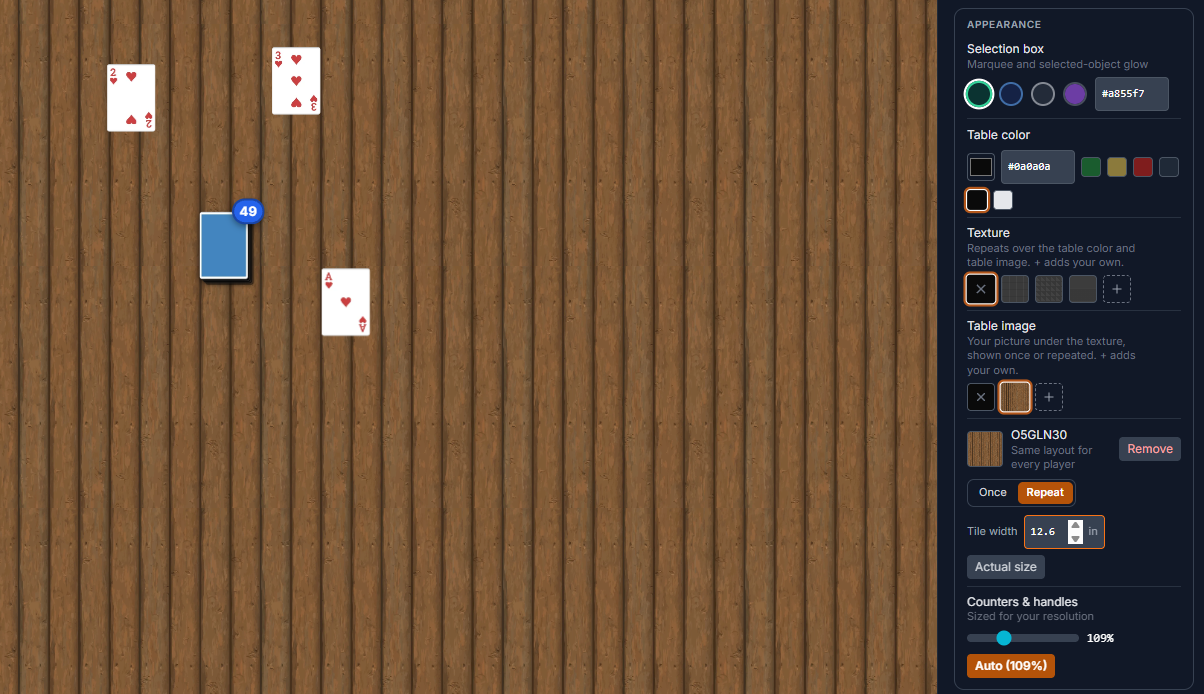
Your Own Table Textures and Images
- Hosts can add their own repeating textures to the Texture row, next to Felt, Linen and Wood Planks
- Hosts can add their own table images under the texture, shown once or repeated across the table
- Use both together, like a play mat or repeating pattern with a texture over it
- Each player picks their own. Pin one in Setup defaults to start everyone on it
- Set the size in inches or use Actual size. Up to 12 per table, saved with the setup
Two-Page Rulebook Spreads
- Rulebooks can open like a printed booklet: the cover alone, then pages 2-3, 4-5 side by side, then the back alone
- Hosts: right-click a book and choose Show Two-Page Spreads to open it that way for everyone. It saves with the setup
- Players: turn on Two-page rulebook spreads in Player Options, or use the open-book button on the preview's page bar, for your own preview
- Page turns and the page counter move a spread at a time, for image and text rulebooks
- Labels, marks, snap points and stickers stay on the page you put them on
Fit a Board's Grid to Its Art
- Board Grid now has Fit to a Box: enter how many cells your art's grid has, then drag a box around it
- The grid fills that box exactly, and pieces only snap inside it, so borders and walls never snap
- Square cells match the art's cells. Hexes stay regular, centered in the box
- Move nudges the grid and Reset puts it back
- The fit saves per face with the component, stays on the art when the board is resized, and can be edited in the component editor's Appearance tab
Files Tab in the Components Sidebar
- A new Files tab shows your My Files right in the playtest room: folders, pictures, Upload and New Folder
- Drag a picture onto the table to make a new component from it, with no upload or folder step
- Drop images or whole folders from your computer onto the tab to upload them into the folder you have open
- Hover a picture to rename or delete it, and open the full File Manager in one click
Grid View for Your Components
- Switch your project's components between a list and a grid of art
- Your choice is remembered in your browser
Save / Load Shows Unsaved Changes
- The floppy disk pulses and glows cyan while the table has changes since the setup you last loaded or saved
- Moving the camera does not count
- It settles again as soon as you save or load a setup
Improvements
Redesigned Components Sidebar
- Three tabs: Project, Generic and Files
- Bigger thumbnails with quantity badges, and decks, stacks and rulebooks drawn as small piles
- Edit, Duplicate and Delete appear when you hover a component, and always show on touch screens
- The search bar and section headers stay in view while you scroll long lists
- Project dependencies now sit in the Project tab, under your own components
- Clear messages when a search finds nothing or a project has no components yet
Thank Your Testers
- A one-tap Thanks button on each feedback response in a playtest session
- Signed-in testers get an email (they can turn it off under Thanks from designers)
- New Helpful Tester accolade at 1, 10, 50 and 150 thanks
Competitions
- When a competition opens for entries, designers who signed in within the last 90 days get an email about it
- Open competitions show in Needs Attention on your dashboard until you enter
- Judges can add late entries after the deadline, by share link or with a late-entry pass
Stickers
- Sticker scale now goes up to 40x (32 inches)
- The Sticker panel shows how big a sticker is on the table in inches
Saving Setups
- Save now opens on Overwrite Existing, with the setup this table came from already picked
Search in Every Tab
- One search box filters whichever tab you are on, including Generic pieces and your files
A Tidier Toolbar
- Layers and the Notepad now sit on the left of the divider, with your other personal tools
- The blindfold is now a round button next to the view compass
- The blindfold overlay now has a Remove Blindfold button on desktop too
- The Save / Load button is now a cyan floppy disk, so it is easy to spot
Fixes
Room Sync
- Quick moves are no longer lost or doubled while the server confirms them: two fast drops making a pile, a card dragged during a resync, a draw straight into your hand
- A piece another player is holding can no longer be stacked onto or selected
- Cards given between hands can no longer get lost on the way
- A refused draw no longer leaves a ghost card on other players' screens
Rulebooks
- The eraser only erases on the page you are on
- A label dragged onto a book keeps its page
- The one-page preview only shows that page's labels
- Stickers on a book belong to the page they were placed on
Files and Share Links
- Moving a file into a folder in My Files no longer breaks the components that use it
- Deleting a file now clears it everywhere it was used
- Share links open the game's current art. Competition entries keep their submitted art
Room
- Hosts can get back into their own closed room
- Undoing a scale keeps a stack's tokens the same size as the stack
- Stack counts are no longer hidden behind the lock icon of a piece underneath
- Camera Views closes on touch screens
- The View Details arrow no longer points at the delete button
- A mistyped address shows a not-found page instead of an error
Randomize Keeps the Grid
- A zone with both Randomizable and Grid Layout now shuffles which piece goes in which cell
- Pieces stay in the grid instead of scattering across the zone
Dropped Pictures Start as Cut-Out Tokens
- A picture dragged onto the table, from your computer or the Files tab, now starts as a Token with Use Image as Mask on
- Transparent backgrounds are cut out along the art. Pick Card in the window for card art
- Use Image as Mask now starts with no tint, instead of a solid white one
Sidebar
- Searching the sidebar for a token, die, board or other piece by name now finds it
- The Expand all control no longer disappears after refreshing the component list