Probability Calculators
Crunch the numbers on your game's dice rolls and card draws before you ever sit down to playtest.
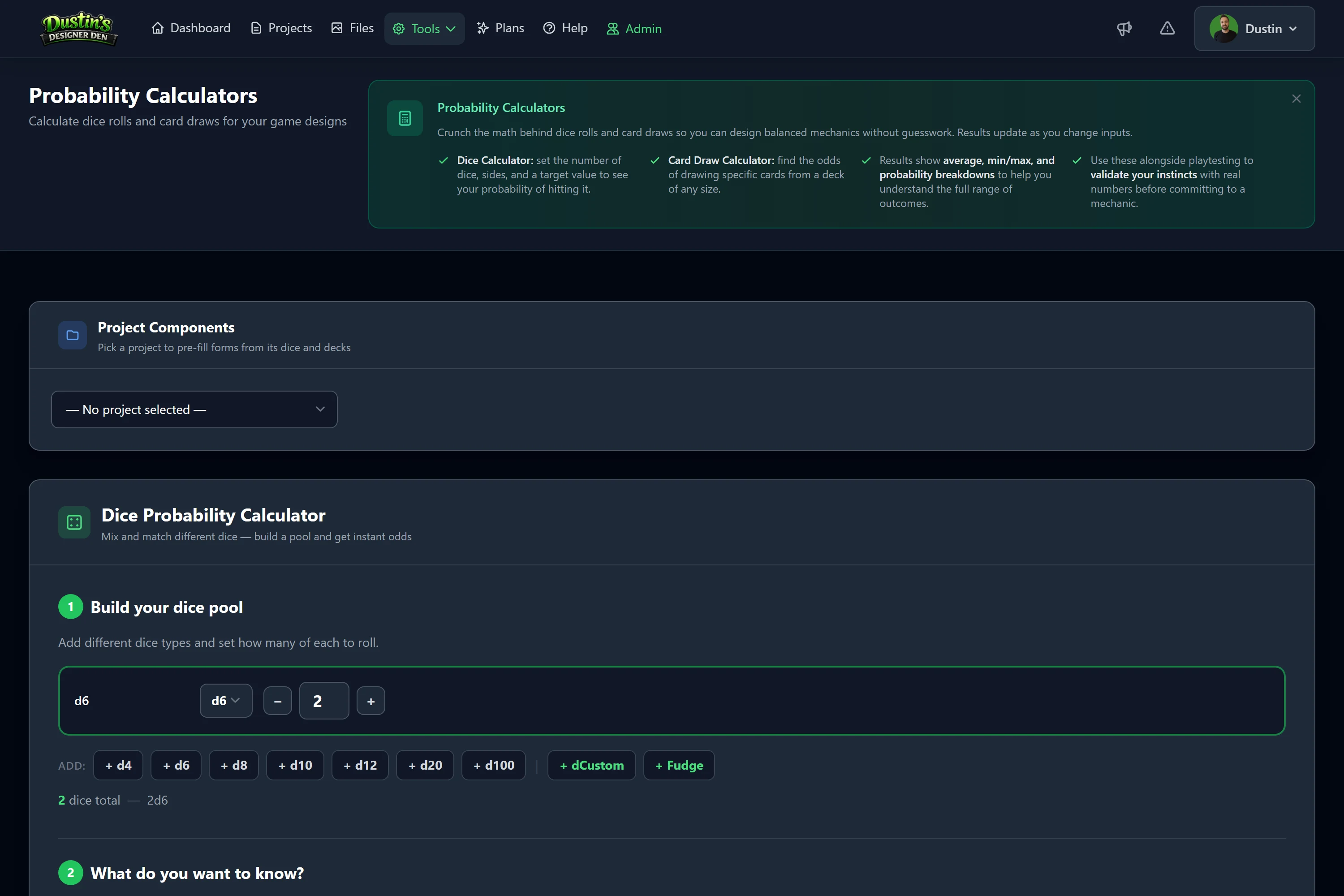
Overview & Why It Matters
The Probability Calculators help you understand the statistical backbone of your game mechanics before playtesting. Instead of discovering a mechanic feels terrible after 10 play sessions, you can calculate upfront that a player has only a 4% chance of succeeding, and adjust accordingly.
There are three calculators:
- Dice Pool: Mix different standard dice and model any pool.
- Card Draw: Calculate the odds of drawing specific cards from a deck.
- Custom Dice: Analyze image-face dice from your actual game components.
Access: All three are available under Calculators in the navigation menu. Your last 10 calculations are saved automatically.
Dice Pool Calculator
Build any combination of polyhedral dice and instantly get probability breakdowns.
Step 1, Build Your Dice Pool
Click the quick-add buttons to add dice types: d4, d6, d8, d10, d12, d20, d100, dCustom, and Fudge.
- Use the +/− buttons or type a number to set how many of each die to roll.
- dCustom: enter comma-separated face values (e.g.
1,1,2,3,5,8). - Fudge: pre-loaded with
-1,-1,0,0,1,1(standard FATE/Fudge die). - Add as many die types as needed, the pool summary shows your total count.
Step 2, Choose What to Calculate
- Show me the average and range: minimum possible roll, maximum, and the statistical average. Useful for calibrating balance.
- I need to hit a specific total: enter a target (e.g. 15); shows the probability of rolling at least that total, plus a full distribution chart.
- Count how many dice succeed: set a success threshold (e.g. "4 or higher"); shows the expected number of successes and a per-die-type hit breakdown. Perfect for dice-pool combat systems.
What the Results Show
- Big percentage / average: the headline probability or average roll.
- Rating badge: Very Likely / Good Odds / Coin Flip Territory / Long Shot.
- Pool breakdown: each die type's individual contribution shown as a bar.
- Distribution chart: every possible total and its exact probability (when ≤ 200 distinct outcomes).
- Plain-English explanation: a sentence describing what the numbers mean.
Card Draw Calculator
Uses hypergeometric probability, the mathematically correct model for drawing cards from a finite deck without replacement.
Inputs Explained
| Input | Meaning |
|---|---|
| Deck Size | Total number of cards in the deck (e.g. 54). |
| Target Cards | How many copies of the card you're hoping to draw exist in the deck. |
| Cards to Draw | How many cards you draw (e.g. an opening hand of 7). |
| Mode | At least one, any copy in hand. Exactly N, a precise number. At least N, N or more copies. |
Design Questions This Answers
- "If I put 3 copies of my key combo card in a 40-card deck, what are the odds of having it in my opening hand of 5?"
- "Is my starting resource card frequent enough at 8 copies in 54?"
- "Will players reliably see this mechanic by the midgame?"
Project shortcut: If you've added card components to a project, use the project picker to load your decks. Click a deck name, then a specific card, and the calculator pre-fills the deck size and copies for you.
Custom Dice Calculator
Analyze dice that use custom image faces (action dice, symbol dice, faction dice). Tied directly to your project's custom dice components.
- Select your project from the project picker.
- Your custom dice appear, click a die to add it to the pool and set quantity.
- Click any face image from your die to set it as the target face.
- Choose your success mode: at least one, exactly N, or at least N.
- Hit Calculate, the system counts matching faces and computes exact odds.
Results Breakdown
- Target face image: confirms which face you're targeting.
- Overall probability: odds of hitting your success condition.
- Expected hits: average number of successes across the pool.
- Per-die-type breakdown: each die's individual hit rate (e.g. "Sword Die: 2/6 sides → 33%").
- Hit distribution chart: probability of getting 0, 1, 2… N successes.
Prerequisite: Custom dice must be added to your project with face images uploaded. See the Component System guide for instructions.
Project Integration
The calculators are aware of your projects. The project picker at the top lets you load real game data directly:
- Dice Quick-Pick: your project's dice appear as buttons; click one to add it with its configured quantity (standard and custom).
- Deck Quick-Pick: your decks are listed with total card counts; click a deck to see cards, then a card to auto-fill the card-draw inputs.
Calculations run with a project selected are saved to that project's history so you can track balance changes over time.
Calculation History
Your last 10 calculations are automatically saved and shown on the right side of the page. Each entry shows the type (dice, cards, or custom dice), a summary of the inputs, the headline result, the associated project, and when it was calculated. History is per-user; older entries are removed once you exceed 10.
Reading the Results
Rating Badges
| Badge | Meaning |
|---|---|
| Very Likely | 75%+, happens most of the time. |
| Good Odds | 50–74%, more likely than not. |
| Coin Flip | 25–49%, could go either way. |
| Long Shot | <25%, unlikely, probably needs redesign. |
Distribution Charts
The horizontal bar chart shows every possible outcome, bar width represents the percentage chance of that exact result. Use it to spot a "sweet spot" (a cluster of likely outcomes) or results that are too spread out.
Practical Examples
Calibrating Combat Difficulty
Players roll 2d6 and need an 8 or higher. Pool: 2× d6, Target Total 8 → ~42% (Coin Flip Territory). A fair challenge; drop to 7 and you hit ~58% (Good Odds).
Opening Hand Consistency
A 54-card deck has 4 copies of a key "Setup" card. Deck 54, Target 4, Draw 7, At least one → ~40% (Coin Flip Territory). With 6 copies: ~57% (Good Odds).
Custom Action Die Success Rate
A d6 action die has 2 "Attack" faces; rolling 3 dice, how often at least one Attack? 2/6 Attack faces, 3 dice, At least one → ~70% (Good Odds).
Next: Playtest Analytics