Patch Notes
v1.0.304
Scheduled Playtests, Spectator Mode, Player Options and Game Pages, oh my!
Dustin Hendrickson
New Features
Scheduled Playtests (Pro)
- Post a time from the Scheduled tab in your project's Playtesting section, or click a day on your dashboard's Playtest Calendar.
- Playtests are private by default: send testers the invite link. Make one public to also list it on the Play page.
- Attach files from My Files, like rulebooks or reference sheets. Only you and booked testers can open them.
- You get an email when it's time to start. Starting it opens a private room with your saved table setup.
- If it isn't started, or no tester joins, within an hour, it's cancelled automatically.
Booking a Seat
- Anyone can book, with or without an account. Without one, leave an email to get the same updates, or just a name for none.
- Testers get a confirmation with a calendar file, reminders a day and an hour before, and the join link when you start, all in their own time zone.
- Add a playtest to Google Calendar or Outlook from its page, or download the calendar file for Apple Calendar and others.
- After it ends, testers get a thank-you email with your game's feedback form. You can switch the form off per playtest.
Waitlists
- When every seat is taken, testers can join the waitlist.
- A seat that opens goes to the first person in line automatically, and they're emailed that it's theirs.
- Release a no-show's seat and it goes to the next person in line, or to anyone who books.
Repeating Playtests
- Repeat a playtest every week or every two weeks, for 2 to 8 sessions.
- Each session has its own seats and link, and keeps its start time when the clocks change.
- The playtest's page lists the other dates, and you can cancel one session and every later one at once.
Playtest Calendar
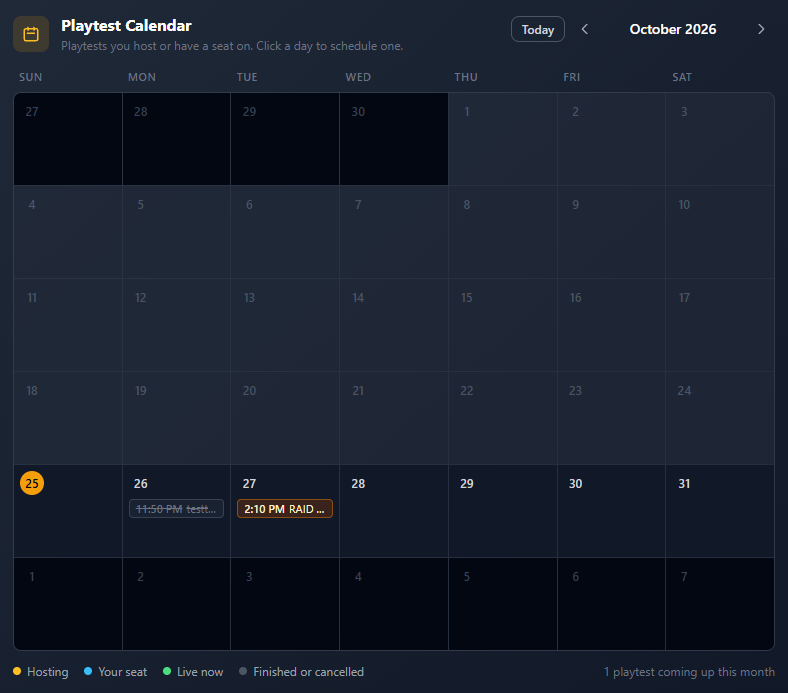
- A new dashboard calendar shows the playtests you're hosting or have a seat on, month by month.
- Click a playtest to open it, or go straight to editing one you're hosting that hasn't started.
- Click an open day to schedule a playtest with that date and time filled in (Pro).
Spectators (Pro)
- Turn on Allow spectators in Room Options. It's saved with your table setup.
- People pick Watch as a spectator on the join screen, or Watch on the Play page.
- A live scheduled playtest offers Watch as a spectator on its page too.
- Spectators don't take a seat and can't touch the table. They see every move a moment after it happens.
- Players see how many people are watching.
Game Pages
- Turn on a public page for any game from its project page.
- It shows the game's art and description, setups anyone can play, live rooms to join or watch, public playtests, and competition honors.
- Game names on Play page cards link to their game page.
Hold to Move Piles
- New player option: hold a deck, stack or bag still for a moment, then drag to move it. Shift+Drag still works too.
Select Matching Pieces
- Ctrl+A now selects every loose piece on the table with the same shape as the selected one, even when they come from different components.
Improvements
Play Page
- Upcoming Playtests cards now show the game's art and tagline, a search box, and Book a seat, or Join the waitlist when full.
Game Crafter Imports
- Identical cut pieces now share one shape and one size, so they stack into decks and stacks. Earlier imports were repaired automatically.
Help Center
- The Scheduled Playtests, Spectators and Playing Shared Games articles now cover all of the above.
Fixes
Long Playtests
- Ending a playtest with a very long action history no longer fails with an error.
Deck Search
- Deck search now previews the card you're hovering, even after the list re-sorts.
Rulebook PDFs
- Importing a rulebook PDF when your storage is full now says so, instead of "something went wrong".