Deck & Stack Builder
The Deck & Stack Builder lets you assemble reusable groupings of your components:
- A deck is an ordered grouping of cards.
- A token stack is an ordered grouping of tokens.
A booster pack is not built here. A deck or stack contains its components in a set order; a pack only references what it could give you and rolls the result when a player opens it. A pack tier can point at a whole deck built here, meaning "any one card from it", so a deck is worth building first.
The key idea: a component isn't locked to a single deck. One card can belong to many decks (and one token to many stacks), and the component is the single source of truth — edit or re-import it once and every deck/stack it's in updates automatically.
You'll find it in the Components page under the Decks & Stacks section.
Building a Deck or Stack
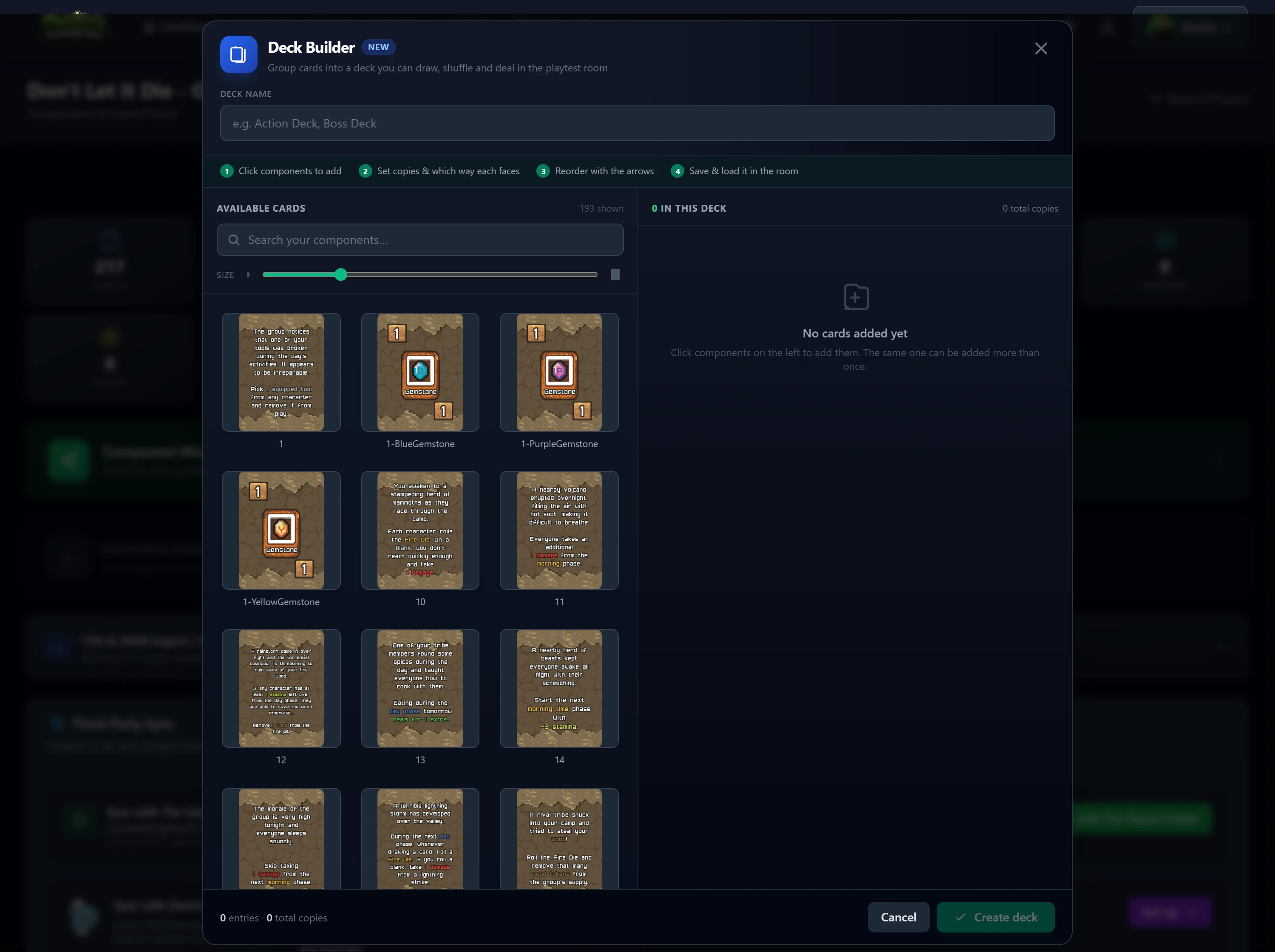
- On the Components page, open Decks & Stacks and click + New Deck or + New Token Stack.
- Give it a name.
- From the left pane, click components to add them. The picker shows only the matching type — cards for decks, tokens for stacks.
- On the right, fine-tune each entry:
- Count (×N): how many copies of that component go into the deck/stack when it spawns in the room.
- Facing: an optional default orientation for that entry (or leave it on Facing to inherit the component's own setting).
- Order: drag a row up or down, or use its up/down arrows.
- Add again: the same component can appear more than once as separate entries if you want.
- Click Save.
Working Faster: Dragging and Multi-Select
Clicking a component still adds it straight away, so nothing you already do changes. These shortcuts are there when you are assembling a larger deck.
Dragging
- Drag a component from the left pane into the list to drop it at an exact position, instead of adding it to the end.
- Drag a row within the list to reorder it. Grab it by the grip dots, or anywhere on the row that is not a button or input. A green line shows where it will land.
- Dropping outside the list cancels the drag and changes nothing. So does pressing Esc mid-drag.
Selecting several at once
- Ctrl-click a component or a row to add it to a selection.
- Shift-click selects everything between your last click and this one. In the left pane the range follows reading order, left to right and wrapping to the next line, because the picker reflows as you resize the panel or move the thumbnail size slider.
- Esc clears the selection.
Acting on a selection
- With components selected on the left, Add N puts them all in at once.
- With rows selected on the right, you get Flip, Copies… to set the same count on all of them, and Remove N. A bulk removal offers a one-step Undo, which stays available until you make another change to the list.
- Dragging any selected item drags the whole selection, and it lands as one contiguous block in the order it had before.
Note
Dragging is a mouse and trackpad feature. On a touchscreen, tap to add and use the up/down arrows to reorder, which do exactly the same thing.
Note
Decks hold only cards and stacks hold only tokens. Editing a card once (its art, name, size, etc.) updates it in every deck that contains it — you never copy a card between decks.
Note
A deck or stack must be uniform in shape — every card in a deck shares the same card mask, and every token in a stack shares the same shape. This keeps piles shuffling, flipping, and stacking cleanly on the table. The picker only offers matching pieces, and an import won't drop a mismatched-shape component into an existing group. If you add several at once to an empty group, the first one sets the shape and the Builder tells you how many of the rest it skipped.
Note
If you change a component's shape after it is already in a deck, that deck ends up mixing shapes and cannot be saved until it is one shape again. Open it and the Builder says which shapes it now contains, highlights the entries that no longer match, and offers a Keep only button per shape. Picking one removes the rest, and a one-step Undo is offered in case you picked the wrong one.
Using Them in the Playtest Room
Saved decks appear in the room sidebar under Cards, and token stacks under Token Stacks. Spawn a whole deck or stack onto the table with one click; copies, order, and facing follow what you set in the Builder. From there they behave exactly like any deck or stack — draw, shuffle, flip, and deal all work normally (see Cards & Decks and Token Stacks).
Tip
Reusing components across games? Add another of your projects as a project dependency in the room — its decks and stacks (built in that project) show up in the sidebar alongside this game's.
Importing Into Decks & Stacks
CSV, JSON, The Game Crafter, and Dextrous imports can place a component into groups automatically:
- Cards: a
deck_namecolumn, ordeck_namesfor multiple decks separated by a pipe (|), e.g.Base Game|Tutorial. - Tokens: a
stack_namescolumn, pipe-separated for multiple stacks.
Importing is idempotent and rename-friendly within a run: re-importing the same rows won't create duplicate memberships, matching groups by name (case-insensitive) and creating any that don't exist. A row with no group name just updates the component and leaves its existing memberships alone.
A Tabletop Simulator import builds groups a different way, because there are no columns to read: every deck in the mod becomes a deck group holding the cards that were inside it, in the order Tabletop Simulator had them. A stack of tokens in a mod arrives as a pile on the saved setup rather than as a stack group.
Note
Import manages its own membership entries. If you've also added the same component to a deck by hand in the Builder, a later import that lists that deck may add its own entry alongside your manual one — both are kept.
Related: Components · Component Types · Cards & Decks · Token Stacks