Booster Packs
A pack is a sealed booster: you put it on the table, open it, and it gives back a random spread of cards or tokens. It is the right tool for a trading card game, a living card game, or anything where players crack open a product and see what they got.
A pack is different from a bag or a token stack in one important way: a pack does not contain anything. It holds only references to components and decks that already exist in your project, sorted into rarity tiers, plus the odds for each tier. Nothing is decided until somebody opens it.
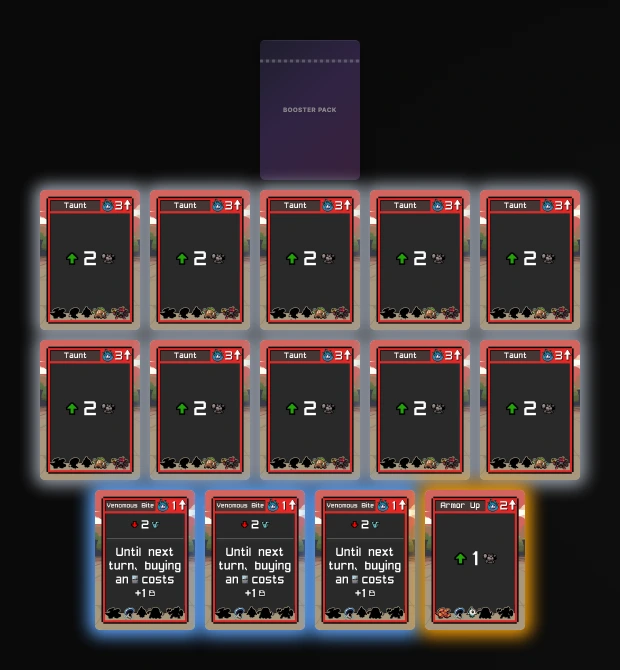
Opening a pack needs an active Pro subscription on the account that owns the project. That is the designer whose game the pack belongs to, not the player who clicks it and not whoever opened the room. So your packs keep working when somebody else runs the table from a shared link or the public lobby, and a Pro player cannot unlock packs in a free designer's game. See Plans & Pricing.
Building a Pack
Add a component and pick Pack as the type, or change an existing component to a pack. The pack's own name, image and colors work like any other component: that artwork is the pack wrapper players see on the table.
The pack's contents live on the Behavior tab:
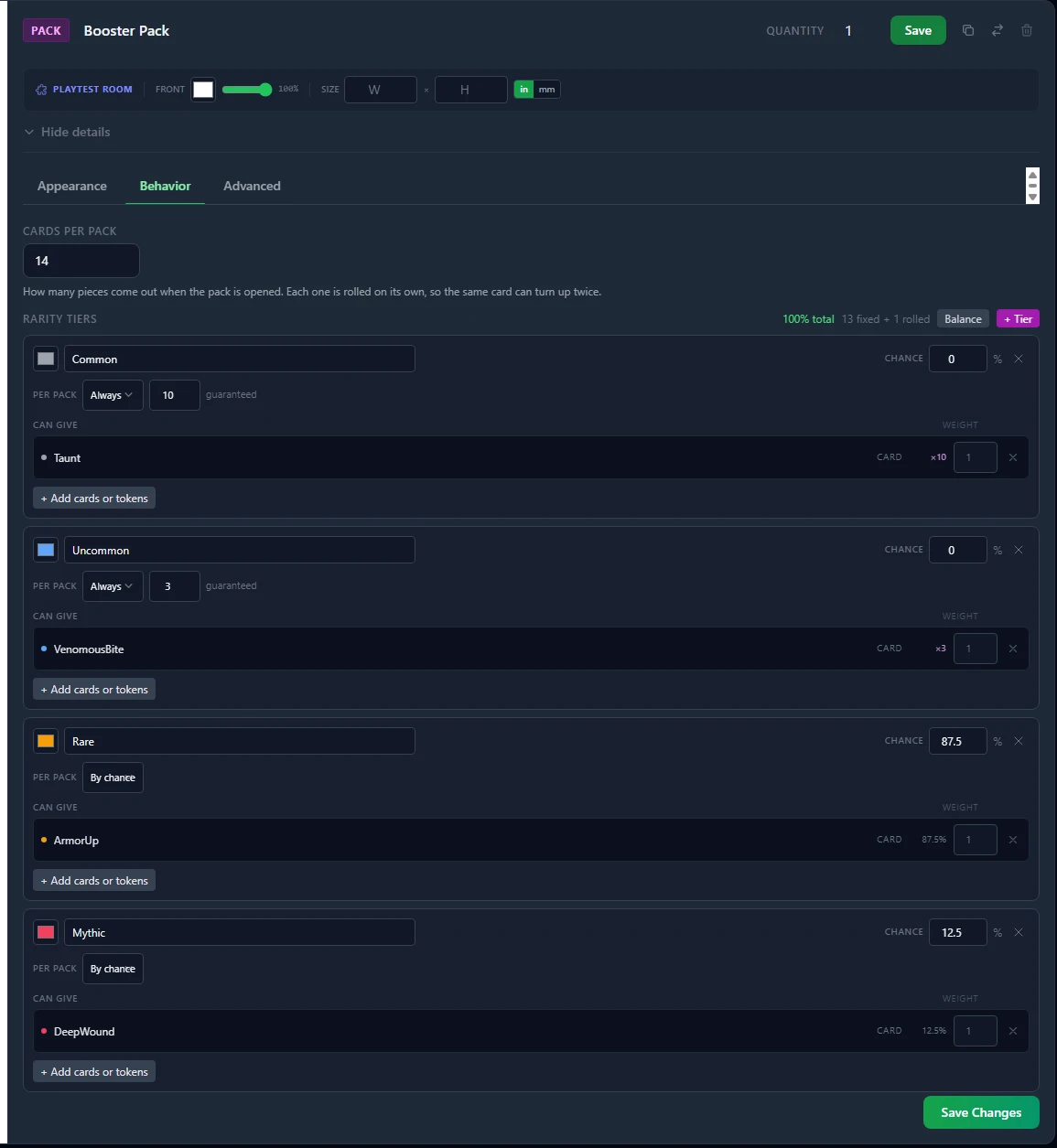
Cards Per Pack is how many pieces come out when the pack is opened.
Rarity Tiers is the list of rarities. Each tier has:
- a name (Common, Rare, Mythic, whatever your game calls them)
- a color, used for the swatch in the odds list and for the glow around a piece that came from that tier
- a chance out of 100
- a list of cards, tokens, decks or stacks that tier can give
Press + Tier to add one, and + Add cards or tokens inside a tier to choose what it can give. The picker has two tabs:
- Cards & Tokens lists every card and token in the project as a thumbnail. Click one to add it.
- Decks & Stacks lists your decks and token stacks. Adding one means any one card from it, chosen when the pack is opened.
Only cards, tokens, decks and stacks from the same project can be picked. Balance splits the chances evenly across every tier you have.
Adding a whole deck
Pointing a tier at a deck saves listing fifty rares one at a time, and the tier keeps up with the deck: add a card to the deck later and the pack can give it out without you touching the pack again.
A deck counts as one entry, whatever its size. A tier holding one card and one fifty-card deck, both at the default weight, gives each a 50% share of that tier, not a 1-in-51 share. That is deliberate: editing a deck should change which card you get, never how often the tier comes up.
Which card you get is weighted by copies, so a deck holding three of a card really is three times as likely to hand you that card.
A deck with nothing in it cannot be saved into a pack, because an empty deck would silently contribute nothing to a pull.
How many of each tier: fixed slots, chance slots, or both
Each tier's Per pack control decides how many of the pack's slots it fills:
- By chance (the default) means the tier competes for whatever slots are left over, using its chance out of 100.
- Always N means the tier fills exactly N slots of every pack.
- Between N and M means it fills a random number of slots in that range.
Guaranteed slots are dealt first; anything left over is rolled against the chances. The header shows the sum as you work, for example 13 fixed + 1 rolled.
That one rule covers the way real card games actually build packs:
| You want | How to set it up |
|---|---|
| A booster of 10 commons, 3 uncommons, and one rare-or-mythic | Common Always 10, Uncommon Always 3, Rare by chance 87.5%, Mythic by chance 12.5%, Cards Per Pack 14 |
| A fixed pack where every copy is identical | Give every tier an Always amount that adds up to Cards Per Pack. No chances needed at all |
| One or two foils per pack, rest random | Foil Between 1 and 2, the other tiers by chance |
| A loot-box style pack where any slot can be anything | Leave every tier on By chance |
Each slot is rolled on its own, so the same card can turn up twice in a single pack.
The chances have to add up to 100%
The editor shows a running total, and it turns green at exactly 100%. A pack whose tier chances do not add up to exactly 100% will not save.
That is deliberate. Quietly stretching 95% back up to 100% would change your odds behind your back and hide the typo, so the pack tells you instead. You can leave a pack with no tiers at all while you are still setting it up: it just cannot be opened until it is finished.
Chances only decide the leftover slots, so a pack whose tiers fill every slot with fixed amounts needs no chances at all and the 100% rule does not apply to it. Equally, the tiers cannot guarantee more items than Cards Per Pack: the editor says so if they do.
Weights inside a tier
Once the roll has picked a tier, it picks one piece from inside that tier. By default every piece in a tier is equally likely.
The small number beside each piece is its weight, and it is relative to the other pieces in the same tier. Leave it blank for the normal chance. A piece with weight 2 is twice as likely as a piece with weight 1 in that same tier. Weights never change how likely the tier is, only which piece you get once that tier comes up.
Opening a Pack
Put the pack on the table, then either:
- double-click it, or
- right-click it and choose Open Pack.
The pack shakes, tears open, and the pieces come out one at a time below it. Each one arrives glowing in its tier's color and keeps that glow for about ten seconds, so you can see at a glance which slot was the good one. If you have reduced motion turned on in your operating system, the animation is skipped and the pieces simply appear.
The opened wrapper stays on the table, dimmed, and its menu item reads Already Opened. Remove it like any other object once you are done with it.
Everyone sees the same pack
The roll happens on the server, once. Every player in the room is handed the same result, and it is written into the table state, so somebody who joins later sees the opened pack and its contents too.
A pack can only be opened once. A second attempt is refused, whether it comes from an impatient double-click, a dropped connection retrying, or two players clicking the same pack at the same moment. If you want another opening, put down another pack.
Checking the Odds Before You Open
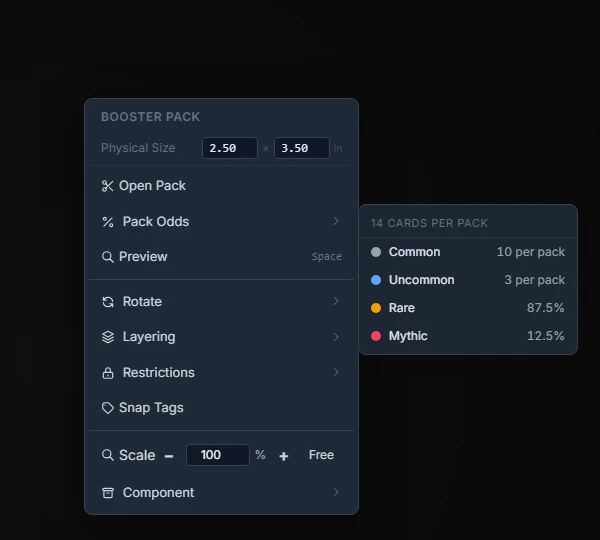
Right-click a pack and hover Pack Odds. It opens beside the menu, headed with how many cards the pack gives, then every tier with its color. A tier with guaranteed slots shows what it always gives (10 per pack) rather than a percentage, because a guaranteed tier has no meaningful chance.
The odds come from the pack's component, so they are the same numbers the designer typed. Any player can read them, including in a room where nobody can open packs.
When a Pack Will Not Open
The message tells you which of these it is:
- "Opening packs needs an active Pro subscription on the account that owns this project." The designer who owns the game is not on Pro. The pack itself is fine.
- "That pack has already been opened." Somebody got there first, or your own click arrived twice.
- "This pack cannot be opened: ..." Its configuration is not valid, and the rest of the sentence says why. The usual cause is a card or token that has been deleted since the pack was built. Fix it on the pack's Behavior tab and place a fresh one.
- "That pack is no longer on the table." The pack object was removed while the menu was open.
A pack that is missing a referenced piece refuses the whole opening rather than handing out a short pack, so nobody ends up with holes in a booster and no idea why.