Plans & Pricing
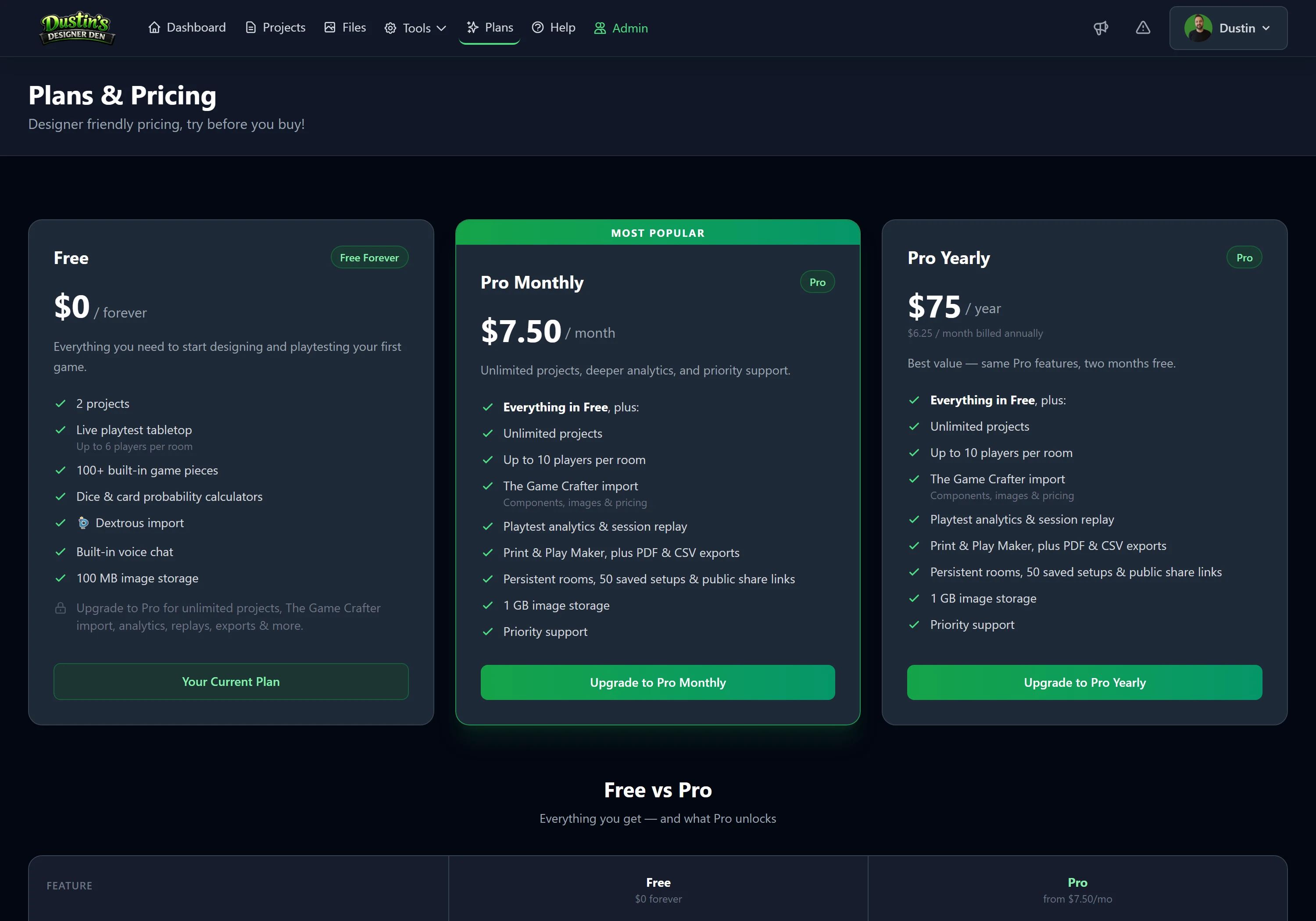
Designer Den has two plans: a genuinely useful Free tier you can design and playtest on forever, and Pro for designers who want unlimited projects, deeper analytics, exports, and the manufacturing and replay tools. This page explains what each includes and how to manage your subscription. For current prices, see the Plans page.
Note
Free isn't a trial; it doesn't expire. You can build components, run real-time playtests, use voice chat, and crunch probabilities without ever paying. Pro lifts the limits and adds the power tools.
What's in Each Plan
| Free (forever) | Pro | |
|---|---|---|
| Projects | Up to 2 | Unlimited |
| Components & wizard | ||
| Realtime playtest table | ||
| Voice chat | ||
| Probability calculators | ||
| Players per room | Up to 6 | Up to 10 |
| File storage | 100 MB* | 1 GB* |
| Saved table setups | 1 per project | Unlimited + share links |
| Playtest analytics | — | |
| PDF & CSV exports | — | |
| Print & Play Maker | — | |
| The Game Crafter import | — | |
| Persistent rooms & public lobby | — | |
| Session replay recording | — |
* Either plan can add more space with optional Storage Add-ons: +5 GB ($2.50/mo), +10 GB ($5/mo), or +20 GB ($7.50/mo), and they stack.
What Upgrading Unlocks
Each Pro feature solves a specific pain point as your design gets more serious:
- Unlimited projects: stop juggling; give every game (and expansion) its own home.
- Playtest analytics: see trends across sessions: which cards get played, how rolls land, and aggregated feedback.
- PDF & CSV exports and the Print & Play Maker: turn your components into print-at-home sheets or a manufacturing spec.
- The Game Crafter import: real print-on-demand pricing and ordering.
- Tabletop Simulator import: turn a TTS save into components, decks and a saved setup laid out exactly as the mod had it.
- Booster packs: sealed packs that open into a random spread of cards or tokens, with rarity tiers you set the odds for. Opening one needs Pro on the account that owns the project, so your packs keep working even when somebody else is running the table.
- Persistent rooms: a table that stays open 24/7 for async play and long campaigns, plus a public lobby for your shared setups.
- Session replay: record a session and scrub back through every move.
- More room & storage headroom: up to 10 players and 1 GB of artwork.
Upgrading to Pro
Open the Plans page, choose Pro, and complete checkout. Your account upgrades immediately: the Pro features above light up right away, including in any project or room you already have open.
Tip
Bumping into a Free limit (a third project, a second saved setup, the analytics tab) is the usual nudge to upgrade. The app will point you to the Plans page right where the limit applies.
Managing Your Subscription
Your subscription is handled through Stripe, our secure payment provider. Everything you need lives on the Plans page: a Manage Subscription box appears there once you're a member, with controls to apply a promo code and to cancel. For the full walkthrough (subscribing, promo codes, changing plans, canceling, failed payments, and exactly what a downgrade does), see Managing Your Subscription.
Important
If you cancel, Pro stays active until the end of the period you've already paid for; you won't lose access mid-cycle. After it lapses your projects are kept, but all of them become read-only until you pick which ones (up to the Free limit) to unlock, and Pro-only features switch off until you re-subscribe. If your uploaded files are over the Free storage limit at that point, the storage grace period applies too (see the storage question below).
Common Questions
Do my playtesters need a paid account? No, players join a room for free with just a code and a name. Only the host's plan matters, and even a Free host can run real-time playtests.
What happens to my extra projects if I downgrade? No project is deleted. When you drop to Free, every project becomes read-only, any open or persistent rooms close, and shared/public setups turn off. From your Projects page you then unlock the ones you want to keep working on, up to the Free limit; the rest stay view-only. Choose carefully: once you've picked, that selection is fixed until you upgrade again (you can't lock one to swap the slot to another project). Re-subscribe and everything unlocks again instantly.
What does "read-only" mean for a project? You can still open and view it, but you can't edit it, change its components, or host playtests until you unlock it (or upgrade).
What happens to my uploaded images and storage if I downgrade? Your limit gets smaller, and the site-wide overage rule applies. If your files fit under the Free limit (plus any Storage Add-ons or bonuses you keep), nothing changes. If you're over it, uploads are blocked and a 14-day grace period starts, with an email and an in-app countdown. Free up space or add storage before the deadline and nothing is removed; otherwise your newest files are deleted automatically until you're back under the limit.
Can I change plans later? Yes, upgrade or cancel anytime from your account. See the Plans page for the latest options and pricing.
Related: Managing Your Subscription · Getting Started · Playtest Analytics · Plans page